

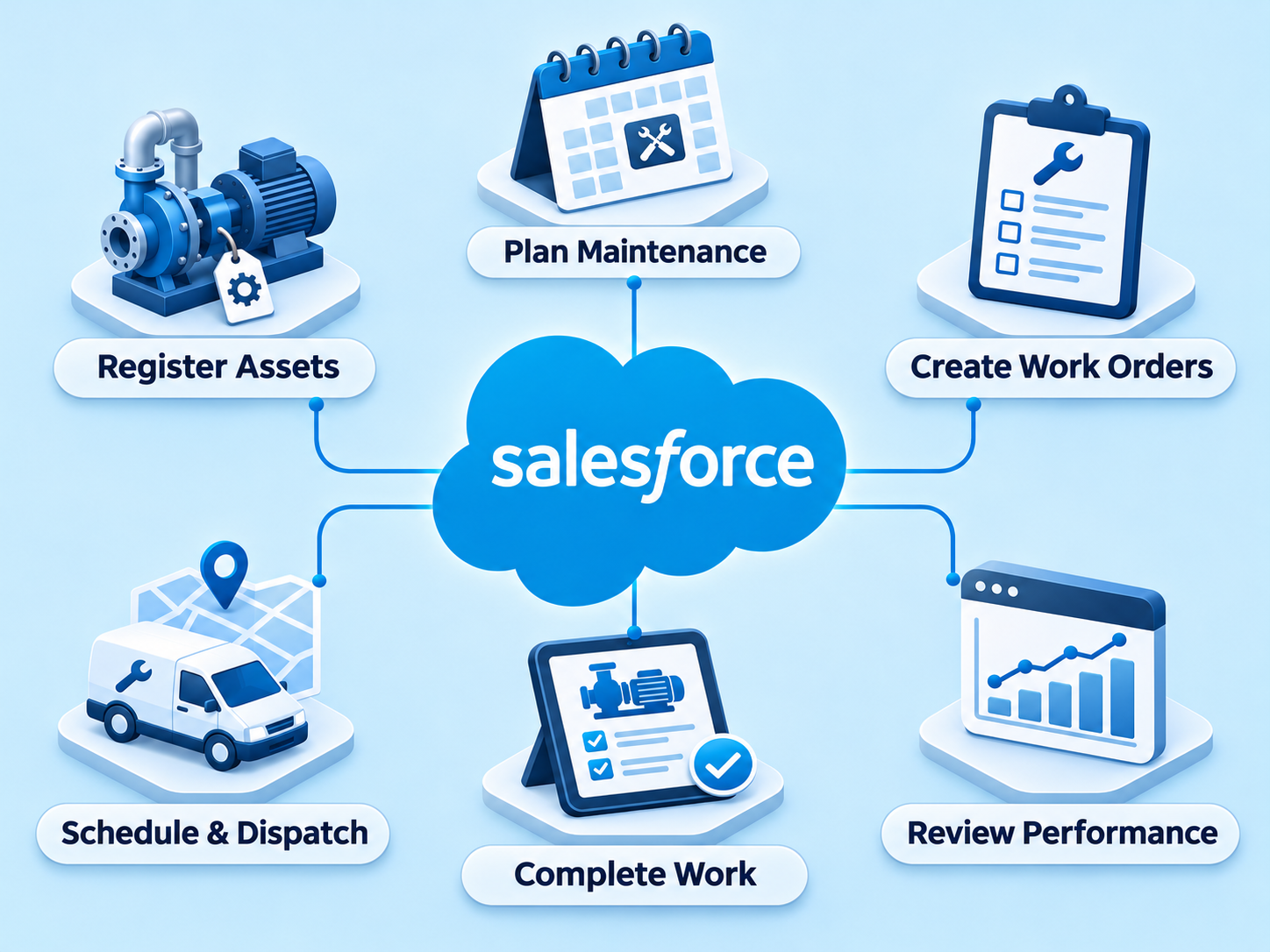
When a pump fails at a customer site, the service team needs answers quickly. Which unit failed? When was it last serviced? Is the repair covered by a service contract? Who can get there with the right parts?
For a small or midsize business, those answers may sit in a spreadsheet, a technician’s notebook, and an email thread. Salesforce Field Service can bring the equipment record, maintenance schedule, work orders, technician visits, and service history into one workflow. That gives office staff and technicians a shared view of the work from the first report to the final repair.
This guide explains how to set up asset operations and maintenance (O&M) in Salesforce, using a commercial pump service company as an example. The same approach can be adapted for businesses that maintain HVAC units, generators, solar equipment, or other assets across multiple sites.
What does asset O&M cover?
Operations is knowing where your equipment is, whether it’s running, who is responsible for it, and which issues need attention. Maintenance is the work that keeps equipment running or restores it after a failure, from routine inspections to emergency repairs.
The two come together when a technician’s findings update the asset’s history and help the operations team decide what to do next. For example, if a pump keeps returning to service after the same temporary fix, its repair history gives the supervisor evidence to schedule a deeper inspection or consider replacement.
The Salesforce O&M Workflow at a Glance
| Step | What the team does | Where it happens in Salesforce |
|---|---|---|
| 1. Register the equipment | Record the serial number, installation site, operating status, and service coverage. | Asset record and related customer or site information |
| 2. Plan maintenance or log a fault | Set up recurring maintenance or record an unexpected problem. | Maintenance Plan for planned work, or a Case if the service desk logs customer reports |
| 3. Create the work order | Specify the inspection or repair, priority, skills, and expected parts. | Work Order, with a Work Type for repeatable jobs where appropriate |
| 4. Schedule and dispatch | Book the visit and assign a technician who has the right skills and availability. | Service Appointment and Field Service scheduling |
| 5. Complete the visit | Record findings, readings, parts used, and any follow-up required. | Field Service mobile app and work order closeout |
| 6. Review and improve | Check overdue work, repeat faults, and downtime by asset or site. | Asset history, reports, and dashboards |
Salesforce Field Service Maintenance Plans can generate work orders for future visits. The work order describes the job, while the service appointment represents the visit that needs to be scheduled. Keeping those separate helps a coordinator see which jobs are due and which already have a technician booked.
How to Set Up the O&M Workflow in Salesforce
1. Register the asset
Start with the equipment your company actively maintains. Create a Salesforce Asset record for each unit and give it a unique identifier. Record the model, serial number, customer, installation site, exact location, and service coverage where relevant. If an existing system already assigns equipment IDs, retain that identifier in Salesforce so your teams can match records across systems.
For example, Pump P-204 · Building B · Basement plant room gives a technician enough information to find the right unit, even when several pumps at the site look identical.
2. Plan maintenance or log a fault
Every job starts with either planned maintenance or a problem that needs attention.
- Planned maintenance: Link the asset to a Maintenance Plan. Set a rule to generate work orders at a calendar interval, such as a quarterly pump inspection. For equipment maintained by usage, such as a generator serviced after a set number of running hours, configure a usage-based rule and make the meter readings available to it.
- Breakdown repair: If a customer reports that Pump P-204 is vibrating, the service desk can log a Case with the symptoms, when they started, and whether the pump is still running. Link the report to the asset so the coordinator can check previous visits and decide whether to send a technician.
3. Create the work order
The Work Order explains what needs to be done. A preventive maintenance plan can generate it automatically when its configured conditions are met. For a breakdown, the coordinator can create a work order once they determine that a site visit is needed.
For Pump P-204, the work order might specify a vibration inspection, the urgency of the job, the skills required, and any tools or parts the technician should bring. For recurring inspections, use a Work Type to give the team a consistent starting point for the job scope.
4. Schedule and dispatch the technician
Create or review the Service Appointment linked to the work order. The work order describes the job. The service appointment represents the visit you need to schedule. This distinction helps the coordinator see which jobs are ready for dispatch and which already have a visit booked.
Assign a technician based on skills, availability, location, and job priority. Confirm site access and parts availability before dispatch. For the pump inspection, that might mean booking a technician who can diagnose vibration issues and confirming who can unlock the plant room.
5. Complete the work and update the asset history
Give technicians a short mobile checklist for closing out each visit. Record what they found, what they did, which parts they used, and whether the equipment returned to service. The Salesforce Field Service mobile app supports offline work and lets technicians request parts and record what they used.
If the technician finds a worn bearing and needs to return, record the visit outcome and keep the repair work visible with an assigned next action. Once the bearing is replaced, capture the post-repair reading and the time the pump returned to service. Those details give the next technician a usable service history.
6. Review performance and improve the plan
Use reports and dashboards to answer questions your team can act on each week.
- Which assets have overdue maintenance? Prioritise the equipment that would cause the most disruption if it failed.
- Which assets keep breaking down? Compare repeat callouts by unit, site, or model to identify where a deeper inspection may be warranted.
- What is extending downtime? Record when the asset went out of service and when it returned. Track delays caused by parts, site access, or scheduling so the team can address them.
If your ERP manages purchasing and fixed-asset accounting, use the shared asset ID to connect the records where needed. Salesforce can show that the repair is waiting for a bearing, while the ERP tracks the purchase order.
Benefits of managing asset O&M in Salesforce
| Benefit | What it means for an SMB |
|---|---|
| Fewer missed maintenance visits | Recurring work orders give coordinators a list of upcoming jobs before they become overdue. |
| Faster response to breakdowns | Coordinators can find the equipment location, previous repairs, and service coverage before dispatching a technician. |
| Better-prepared technicians | A clear job scope and parts list help technicians arrive ready for the work and can reduce avoidable return visits. |
| Clearer customer communication | Office staff can check the job status and explain what’s happening next without chasing updates by phone. |
| Better repair-or-replace decisions | A history of recurring faults, parts usage, and downtime helps managers decide when continued repairs make sense. |
| More consistent service records | A standard closeout gives the next technician a usable record of what was inspected, repaired, or left pending. |
Start with one site or one equipment type
At Sraban Tech, we’d start with one equipment type and test two jobs end to end. Run a planned maintenance visit and a breakdown repair that requires a second visit. Check that the coordinator can schedule the work, the technician can record the outcome, and the supervisor can see what’s still open.
Before expanding, open an asset record and ask three questions. What’s installed here? What happened last time? What needs to happen next? If your team can answer all three without searching through spreadsheets and messages, the workflow is ready to build on.
Planning to manage equipment maintenance in Salesforce? Talk to Sraban Tech about mapping your current process and setting up a Field Service pilot around the assets and jobs that matter most to your business.